I was carrying out some tests with WebODM in the field and as a "portable computer" I took my Samsung Tab S9 Ultra that runs Android. But I noticed that when I send the photos to both GCP Editor Pro and WebODM itself for processing, it gives an error, as it cannot locate the GPS metadata of the photos. After some searches on the Web I discovered that a few years ago Google implemented an algorithm in the system's photo selector that resets the GPS metadata of photos, however it can be bypassed if the file selector is called and not the photo selector (according to the Stack Overflow thread https://stackoverflow.com/questions/70865878/picking-photo-from-web-in-android-no-longer-includes-exif-gps-location). So could there be a fix to allow the WebODM to be used on Android-based devices?
Problem on Android device and viewing the project map on any platform
10 Replies
Potentially, but that really looks like a browser problem
Can you try with Firefox?
Yes, I tried with Firefox, Samsung Browser, Google Chrome, and Brave—including in incognito mode on all of them
I investigated further by testing Opera on Android with another browser (including in an incognito tab) and the problem persists. In order to confirm the problem I tested it on an Android phone and the problem is reproducible, considering that my Android phone is rooted, I installed with root a program other than "android photopicker" to select the images and when I send it WebODM and GCP Editor Pro can perfectly identify the metadata of the photos
From what I read on the internet, Android Photopicker automatically changes photo metadata for privacy reasons before sending them. Therefore, in order to allow the use of WebODM on Android, it is necessary to change the trigger from photo to file so that the android photopicker is not called, but the traditional file explorer, or if there is system root privilege, bypass the android photopicker using some other application
That makes sense; if you can test and send a pull request that on Android switches the media filter I'd be happy to review/merge it, or just open an issue and it'll get done when it gets done
In both cases, it is good to document what happened so that future users know what causes it and how to get around it.
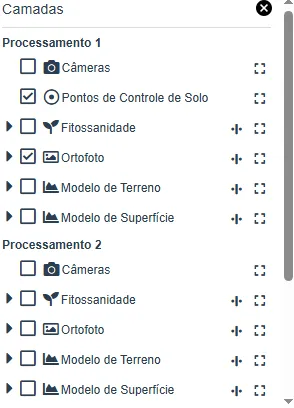
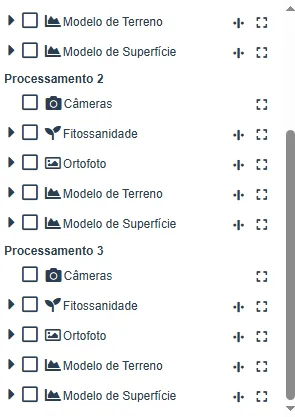
Perfect Piero! I'll do it as soon as possible! I even recently identified a problem in viewing maps in WebODM that is not related to the main topic of the post. When I do multiple processes in the same project using GCP in all processes and click to view the project map (so it loads all maps from all process in the view) I can only see the GCP of one of the processes, not all of them. Even in the layer tab, only the GCP of one of the processes is visible.
Below is a screenshot of the layers tab when I view the project map (contains several processes I did)
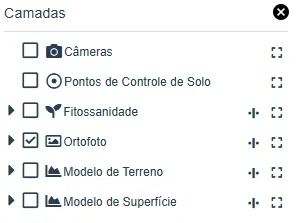
Below is a screenshot of the map view of a process that has a control point, but which does not appear in the project layer tab.
Need more help?
This discussion happened in the WebODM community Discord. Join and ask your own question.
Join View Original ThreadThis page mirrors a public discussion from the WebODM Discord. How to request a removal.