
https://github.com/WebODM/WebODM/releases/download/v3.2.1/WebODM_Setup.exe
When I start the installer nothing visible happens after the UAC.
4 tasks are running indefinitely without anything happening.
Windows 11, all updates installed.
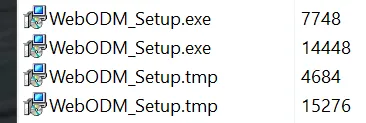
https://github.com/WebODM/WebODM/releases/download/v3.2.1/WebODM_Setup.exe
When I start the installer nothing visible happens after the UAC.
4 tasks are running indefinitely without anything happening.
Windows 11, all updates installed.
OP
Also tried v3.2.0 and v3.1.4.
Same result.
Blank icon in the task bar is also suspicious.

What Firewall/antivirus are you running
OP
No firewall, just onboard Windows AV
OP
Task Manager says no response for Setup/Uninstall and the sub task
OP
I have a PiHole running in the LAN but disabling that did not help either
Can you kill those setup tasks start from scratch and post screenshots of what you see at each stage
OP
Well... as I said... nothing visible, so nothing to screen shot really.
I double-klick the Setup.exe, the UAC comes up, I confirm, then: nothing.
OP
I am happy to screen shot anything helpful if you let me know what exactly you want me to share. Are there any logs anywhere I can share?

Maybe too simple, but did you try rebooting the computer?
OP
I restarted many times. Doesn't help with this issue.
OP
Is there a "manual" way to install? I am stuck.
Yes there's an alternative way to install, you can use docker on Windows via Docker Desktop. Instructions: https://docs.webodm.org/installation/#docker
Although I'd be curious to know why the setup gets stuck, I'm not sure why that would ever happen (AV software being the only suspect, but you mentioned you have the Windows one, which usually behaves correctly)
OP
Where does WebODM normally install to? What's the folder it tries to create in Windows?
C:\WebODM (but the setup should open and ask you which drive you want to install to), so could be D:\WebODM, E:\WebODM, ...
OP
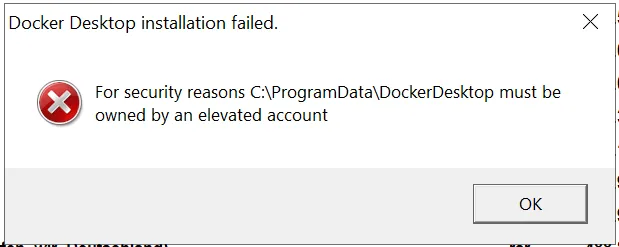
I thought it might have something to do with an error message I get from the docker desktop installer, but I don't see C:\WebODM or anything similar.
Apparently UAC does not handle this correctly and I have to take ownership of the folder manually and I thought maybe that's what is keeping the WebODM installer from doing anything.
 OP
OP
Eventually, the manual docker installation worked as documented. However, the WebODM installer issue remains unresolved for me. If anyone wants me to run test/logs let me know.
I am having the same issue
So it just hangs after double-clicking the setup exe? Do you have any AV/security software that might be blocking / aggressively scanning?
I run malwarebytes and windows defender, but the presence of malwarebytes seems to disable defender. When I look at the system, the setup is actually using cpu but there is no indication of what it is doing. I let it run overnight and this morning I can still run the old version of webodm.
maybe it's malwarebytes
I can turn it off - I wonder what the installer is doing with 4.1% cpu though?
Best answer
Usually that doesn't do it. AV software (apart from Defender) is undistinguishable from malware itself. https://support.microsoft.com/en-us/defender/antivirus-and-antimalware-software-faq
Microsoft security software protects you against malware, spyware, adware, and other unwanted software; you don't need to install any other real-time antivirus or antispyware software.
Well I killed the setup disabled malwarebytes and re ran the setup - behavior is the same
It's not the installer; AV software intercepts file I/O operations, scans, then trips and hangs when there's too many files. And WebODM has a lot of files
Do I need to disable defender also?
No defender is usually fine
it's other AV software that is often at fault
uninstall it if you can, or try on a machine that doesn't have AV software (apart from Defender)
Well I think the only thing left to try is to uninstall webodm and run the latest installer again
OKJ- I can try it on another machine - worth a shot
on another machine the installer runs properly and I get to see all the dialogs whereas on the machine I need it on, I get no dialogs past the UAC.
OK - I will uninstall and try a clean install on this system.
same behavior - I guess I will try a docker install
Docker install fine, though I would like to debug the native win install
Do you have any network drives under "My Computer" ? Any of them disconnected?
yes I do and yes one is disconnected
Many thanks for that - the install now works.
So just to confirm, it worked after you reconnected the network drive?
actually I just eliminated all network drives before installing. I guess the setup was in a loop trying to find the capacity of all the disks.
btw - the software is amazing - great piece of work.
Would you be able to provide some more details about the network drives? Are these normal shared folders? (can you attach a screenshot of the "My PC" screen when the drives are disconnected and the installer doesn't run?) I can't seem to be able to replicate the problem, but would love to fix the installation issue
I'll see if I can replicate the problem.
OK - I have replicated the problem. To summarize: The installer runs, UAC window appears, I respond yes. The installer then appears in the taskbar and is consuming CPU, but no dialogs appear as would be the normal case. This what the disk layout looks like when the problem occurs:
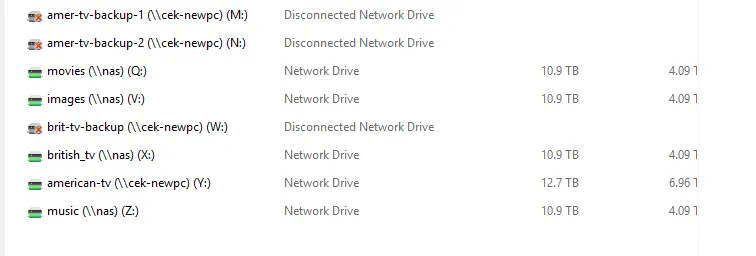
The networked drive state is not strictly the same as it was when I was encountering the failure before. To replicate this, I created 3 shares on another system, used "net use" to connect to them on my system and then on the remote system, I "unshared" them. Previously the disconnected state was the result of connections not being restored after a restart.
If there is anything else you would like me to try, let me know. I could, for example, reconnect one or more of the shares and try the install again.
Thanks for the steps and the screenshots, this helps a lot. Hopefully I can reproduce this and write a fix 🙏
🙂 well if anyone can.......
for what it's worth, I tried and earlier version of the installer (2.0.3) and it hangs the same way.
It seems to be tied to the enumeration of the drives logic, so that the installer can recommend a drive to install to. But I've tried replicating a network drive disconnect scenario, and I can't seem to reproduce the freeze. It's strange, maybe there's other factors at play
Well this won't help, but I repeated the exercise trying disconnected network drives using the same process I described earlier with 1, 2, 3 and 4 drives and I could not get it to fail. I was wondering if the capacity of the disconnected network drive might be a trigger, but it seems not to be the case.
This discussion happened in the WebODM community Discord. Join and ask your own question.
Join View Original ThreadThis page mirrors a public discussion from the WebODM Discord. How to request a removal.