Windows version 3.2.6 Can't process any of my dataset - Errno2 EXIF folder

CharlieWW

I've been using WebODM2.8.1 for a year or so and processes 50 or so datasets. I just upgraded to 3.2.6 and no matter what settings and profile i try, the job fails to process with the following error: FileNotFoundError: [Errno 2] No such file or directory: 'C:\\WebODM\\resources\\app\\apps\\NodeODX\\data\\dc8d3e64-9fcd-4cb4-bc74-4899c4a7be1b\\opensfm\\exif\\.exif'. I've run the same dataset and profile on 2.8.1 without issue. I think its odd that the file path it fails on has double \\ in the file path. I've loaded GCP's so it shouldn't need the exifs anyway? Any suggestions?
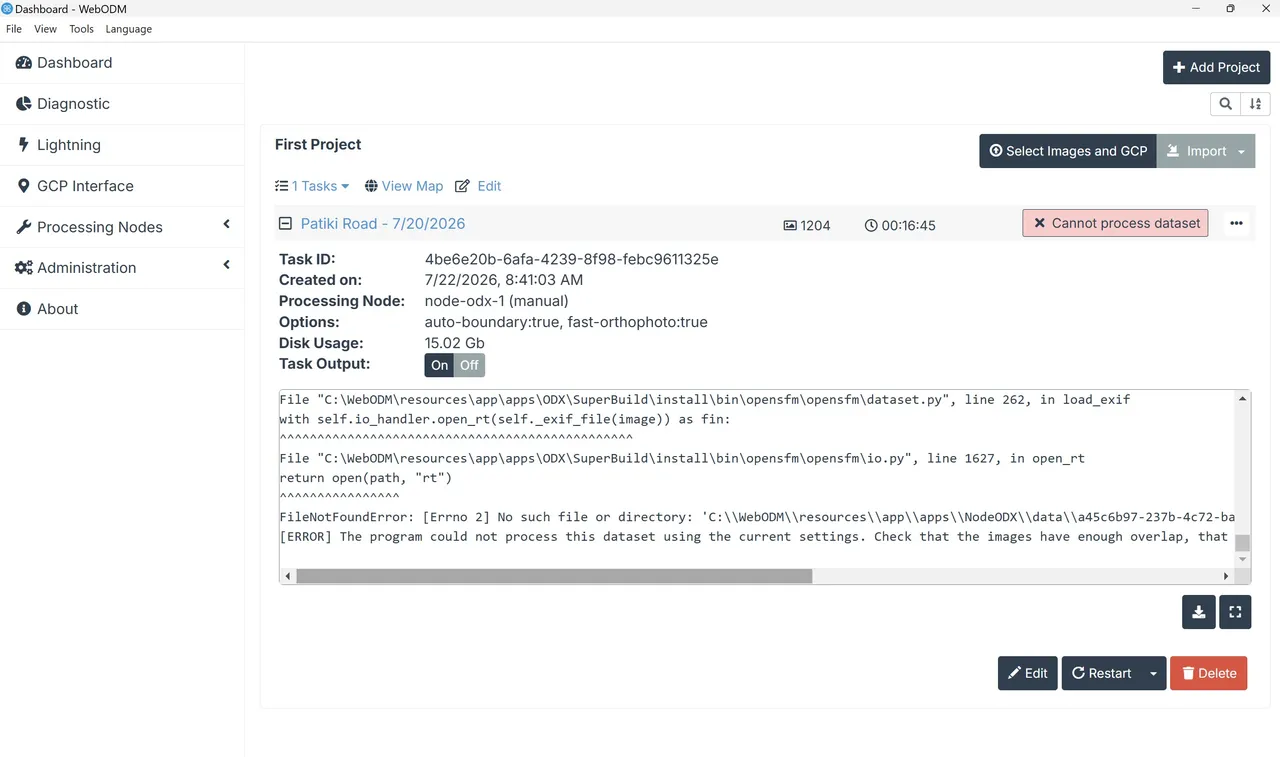
console.txt — view on Discord

6 Replies

Martin Reading (CRYO-GEN)

How much room do you have left on your c drive, best is to install webodm on a drive other than your c drive

CharlieWW OP

My GCP's are in EPSG:2105. I seen other posts with people having issues exporting assets in EPSG:2105 and getting the same ERRNO2 - related maybe? something to do with accessing the CRS files during processing?

pierotofy Best answer

Something's up with CUDA and your graphics card. Try processing with --no-gpu

👍 1
CharlieWW OP

Thanks, worked with no-GPU. Will look into my GPU settings.

CharlieWW OP

Now i just have Reinpv's issue of exporting the point cloud in EPSG:2105.

Need more help?

This discussion happened in the WebODM community Discord. Join and ask your own question.

Join View Original Thread

This page mirrors a public discussion from the WebODM Discord. How to request a removal.