Exceeded Max Retries, Failure to Launch on new install

jmenz37

Hi All,

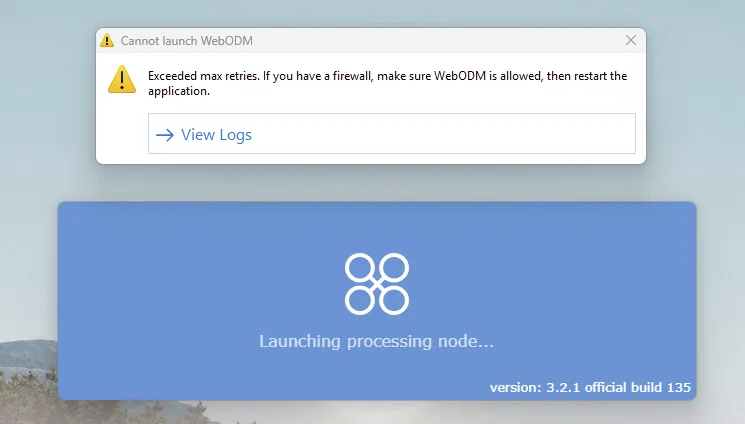
I just did a clean install (updated from 2.8.1) and I get the following when attempting to launch:

Exceeded max retries. If you have a firewall, make sure WebODM is allowed, then restart the application.

Windows 11
Used Windows installer
V 3.2.1

I've run as administrator. Also, when I look in windows defender I do not see WebODM under inbound or outbound. I'm sure this is something simple, but not sure where to go next.

I appreciate any advice,
Jeremy
12 Replies

pierotofy

Can you post your app.log ?

Gary42

I got the same error. I reinstalled 3.2.0 and it works fine.

pierotofy

Mm, strange.

  1. Open C:\WebODM\resources\app\apps\ODM
  2. Run console.bat

Does it open without errors?

If so, run:

python ..\NodeODM\helpers\odmOptionsToJson.py --project-path . bogus

Do you get an error? If so, copy/paste it here, it would help to troubleshoot it.

jmenz37 OP

@pierotofy here is my app.log,

jmenz37 OP

Here is the console error:

jmenz37 OP

sorry needed to be put into a file

jmenz37 OP

I appreciate the help and let me know if there is anything else I can do/give to assist

pierotofy

Can you verify these two:

  1. Is there a C:\WebODM\resources\app\apps\ODM\venv\Scripts\libffi-8.dll file on your system?
  2. After opening the ODM Console, can you post the output of: python -c "import sys; print(sys.path)
pierotofy

I've received confirmation that this might be fixed with the latest version I've just published, which you can download from https://webodm.org/download. So try updating and restarting.

jmenz37 OP

Hey Sorry, I didn't get to trying the things you sent above, but I just updated and it opens/appears to be running properly. Thanks so much for the quick Fix!!!!

👍 1

Need more help?

This discussion happened in the WebODM community Discord. Join and ask your own question.

Join View Original Thread

This page mirrors a public discussion from the WebODM Discord. How to request a removal.